 GitHub
Tabs

Tabs organise and allow navigation between groups of related content without leaving the page.
Usage
Do
- Use tabs to group related content.
- Use tabs to simplify forms, dashboards and settings, to reduce cognitive load.
Don’t
- Avoid using more than six tabs to reduce clutter and make them easier to understand.
- Avoid using tabs for a main menu where a menu is more suitable.
Anatomy
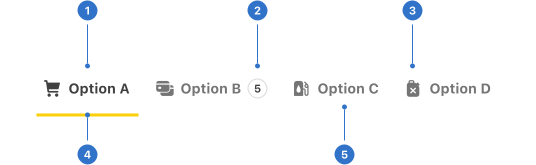
- Label: tab name or title.
- Badge: read-only indicator.
- Icon: graphical signage representing the tab section.
- Indicator: highlighting the current section.
- Background: the colour of the component backdrop.
Live playground
States
- Default is the initial state prior to interaction.
- Active indicates that the item is active.
- Hover provides feedback on mouseover, indicating the tab is interactive.
- Focused communicates that a user has highlighted the tab, using an input method such as a keyboard or voice.
- Disabled indicates the tab is not interactive and cannot be used.
Format
Size
Tabs are available in small and large (default) sizes.
Emphasis
By default, tabs are emphasised in order to highlight them across different interfaces. There is also a non-emphasised version which does not offer much visual prominence, which helps in balancing primary and secondary elements.
Alignment
Tabs can be ordered horizontally or vertically depending upon the context.
Placement
Horizontal tabs can be place above or below content. Vertical tabs can be place to the left or right of content.
Content
Labels
Tabs have a label to describe the content they contain. Labels must be concise and should not use more than two words.
Icons
Icons can be used to add visual meaning to a tab.
Related content
Group tabs with related content adjacent to one another, maintaining a consistent order of tabs.
Accessibility
Shell DS components are programmatically determinable with appropriate semantic markup and are designed to meet colour contrast requirements. If you’re not using Shell DS code, you will need to cover the accessibility considerations for each component in this pattern.
- Icons in the tab must be programmatically identifiable for assistive technology, for example with alt text. This is critically important when the icon-only display type is used.
- Give a unique title to each tab to describe the panel content. This helps users with assistive technology to efficiently navigate the content.
Every effort has been made to ensure that the Shell Design System follows accessibility best practice.
The Shell DS React framework incorporates keyboard operation to support the widest variety of assistive technologies and devices. For any future frameworks other than React, accessibility will need to be reviewed.
Help us to help you by contacting the Accessibility team for support and information regarding any questions relating to accessibility.
Related
Is this page useful for you?
Your feedback helps to improve our documentation.