 GitHub
Tag

Tags categorise, organise or label items with keywords that describe them.
Usage
Tags can be used to display how data has been filtered, categorised or labelled. Keywords are used to differentiate and describe the tags.
Do
- Use tags to indicate different content and data categories.
- Use tags in close proximity to their associated content.
Don’t
Use more than two words per tag.
Anatomy
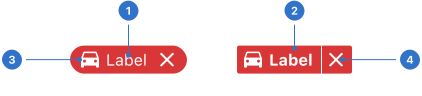
- Label: text inside the tag component.
- Background: colour of the component backdrop.
- Icon: graphical signage supporting the tag label.
- Dismiss icon: cross icon that allows users to delete the tag.
Live playground
Types
- Filled is the default, square tag that is filled with intensity/strong colour.
- Subtle tags are filled with intensity/subtle colour.
- Outlined tags only have a coloured outline.
Variants
- Dismissible tags feature a close icon to allow a user to close or dismiss the tag.
- With labels and/or icons tags can be styled with a label, an icon or both.
States
A tag always has a semantic meaning and uses colour to add visual meaning.
- Neutral indicates something is neither good nor bad and doesn’t require much attention.
- Positive indicates something is good, correct, successful or safe, and should be noticed.
- Negative indicates something is bad, wrong, unsuccessful or dangerous, and should be noticed.
- Information indicates something which is only informational but should be noticed.
- Warning indicates something which is critical or requires caution, and should be noticed.
Format
Size
Tags can be used in three different sizes: small, medium (default) and large.
Icons and labels
If a tag has both a label and an icon, the icon can be placed on the left or right.
Label only
A tag only has a label with no icon.
Icon only
A tag only has an icon with no label.
Shape
Tags have two shapes, square or round.
Colour
At Shell, we use five colours for tags: grey, blue, red, green and yellow.
- Grey, blue, red and green tags have a white label.
- Yellow tags have a grey label.
Content
Ensure that the label text on a tag is relevant and concise, using only one or two words.
Behaviour
Dismissable
Dismissible tags are removed and no longer displayed when the user presses the dismiss icon. This is useful when tags represent a number of selected items.
Accessibility
Shell DS components are programmatically determinable with appropriate semantic markup and are designed to meet colour contrast requirements. If you’re not using Shell DS code, you will need to cover the accessibility considerations for each component in this pattern.
Avoid using colour just to differentiate the categories of tags.
Every effort has been made to ensure that the Shell Design System follows accessibility best practice.
The Shell DS React framework incorporates keyboard operation to support the widest variety of assistive technologies and devices. For any future frameworks other than React, accessibility will need to be reviewed.
Help us to help you by contacting the Accessibility team for support and information regarding any questions relating to accessibility.
Related
Is this page useful for you?
Your feedback helps to improve our documentation.