 GitHub
Table

Tables are used to organise and display data efficiently in cells, columns and rows.
Usage
The purpose of a table is to present data in a grid or matrix with header rows and columns showing the meaning and relationship of data between cells. They are highly customisable to suit a range of use cases.
Do
- Use a table to organise and display data.
- Use to display structured data, where each entry has the same attributes.
Don’t
- Avoid using a table in order to control a page layout.
- Never use a table as a replacement for a spreadsheet application.
Other use cases and alternative components
- To display a continuous list of basic information such as images and supporting text, a simple list may be more suitable.
- To display contained content and actions on a single topic, use cards.
- For hierarchical structures, a tree may be more suitable.
Anatomy
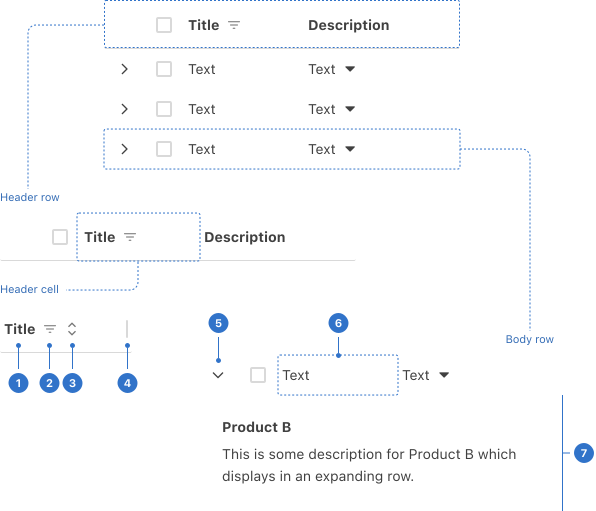
- Label: a title inside the cell.
- Filter icon: a clickable icon to organise table data.
- Sort indicator: a clickable icon to set information as ascending or descending.
- Resize handle: a bar that enables scrolling.
- Expand icon: a clickable icon indicating that the body row can be expanded.
- Body cell: an area that holds content.
- Expanded cell: a cell that has been opened.
Live playground
Types
Default table has a header and body.
States
Empty
When a table has no content or data, you can specify what’s displayed to indicate the empty state.
Header cell
When sort or filter are active for a column they will be visually indicated to show an active state.
Body row
A body row can either be collapsed or expanded.
Format
Size
Tables are extra-small, small, medium (default) and large.
Content
Header
The title should clearly describe the purpose of the data.
Header cell
Use one or two words to describe the column data. Column titles should use sentence case.
Behaviours
A range of properties can be used to customise the table’s behaviour.
Column resize
Header cell displays resize handle so users can adjust the width of columns.
Text overflow
Overflowing text is truncated and indicated with an ellipsis. A tooltip provides full text on hover.
Expandable
Rows can be expandable and display addtional data when expanded.
Filter
Header cells can include a filter icon used to trigger a popover with filter options.
Sortable
Header cells can include a sort icon used to sort options.
Fixed columns
Maintains column position so that are static as a user scrolls left and right to view data.
Pagination
Data in a table can displayed across multiple pages which to be navigated using pagination.
Scroll
A table can be scrolled both vertically and horizontally according to the data displayed.
Accessibility
Shell DS components are programmatically determinable with appropriate semantic markup and are designed to meet colour contrast requirements. If you’re not using Shell DS code, you will need to cover the accessibility considerations for each component in this pattern.
- Ensure table headers are never empty.
- Left-align text to avoid readability issues.
- Right-align numeric data with a consistent number of decimal places to improve how a user scans it.
- Use whitespace in tables to aid scanning.
- Separate data elements visually so that each can be easily identified and read.
Screen readers
- The caption element should be used to associate the respective table with a title or description, if specified.
- Row and column headers must be programmatically identified with th and the scope attribute to identify whether a table header is a row or column header.
Complex tables
It is strongly recommended to simplify tables as much as possible and avoid spanned cells or multiple levels of headers, as more complex tables are not fully supported by all screen readers.
Every effort has been made to ensure that the Shell Design System follows accessibility best practice.
The Shell DS React framework incorporates keyboard operation to support the widest variety of assistive technologies and devices. For any future frameworks other than React, accessibility will need to be reviewed.
Help us to help you by contacting the Accessibility team for support and information regarding any questions relating to accessibility.
Related
Is this page useful for you?
Your feedback helps to improve our documentation.