 GitHub
Checkbox

A checkbox allows users to select or indicate acceptance of one or more items in a list. Each checkbox is independent and should not affect other selections.
Usage
Do
- Use when you want to show all items which can be selected.
- Use when one or more items can be selected.
- Use when you need to obtain acceptance from the user.
Don't
- Avoid when you need items to be selected exclusively.
- Avoid long lists of checkboxes where space is limited.
Anatomy
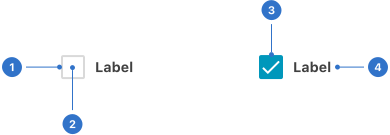
- Border: a linear frame around the checkbox.
- Background: the interior colour of the checkbox.
- Label: the checkbox name or title.
- Icon: a visual cue indicating the selection status of the checkbox.
Live playground
States
A checkbox can be checked or unchecked.
- Default communicates that a checkbox is interactive.
- Indeterminate indicates the checkbox is neither checked nor unchecked.
- Disabled indicates the checkbox is not interactive and cannot be used.
- Invalid indicates an input error in the checkbox.
- Focused communicates that a user has highlighted the checkbox, using an input method such as a keyboard or voice.
- Pressed communicates that a user has initiated an action in the checkbox.
- Hover provides feedback on mouseover, indicating the input is interactive.
Format
Size
Small, medium (default) or large allows a user to select the size of the checkbox for the context they are working within.
Accessibility
Shell DS components are programmatically determinable with appropriate semantic markup and are designed to meet colour contrast requirements. If you’re not using Shell DS code, you will need to cover the accessibility considerations for each component in this pattern.
- The checkbox label must be clear and concise.
- Ensure the element and label are selectable to select/deselect the checkbox, to provide a more generous clickable area.
- Default form controls.
Ensure the name and role can be programmatically determined.
- Allow user settings for states, properties and values to be programmatically set via an input device like a keyboard.
- Notify user agents (including assistive technologies) of changes. For example, a screen reader user will hear when a checkbox is checked or unchecked, as they interact with it.
Every effort has been made to ensure that the Shell Design System follows accessibility best practice.
The Shell DS React framework incorporates keyboard operation to support the widest variety of assistive technologies and devices. For any future frameworks other than React, accessibility will need to be reviewed.
Help us to help you by contacting the Accessibility team for support and information regarding any questions relating to accessibility.
Related
Is this page useful for you?
Your feedback helps to improve our documentation.