 GitHub
Date picker

A date picker allows a user to select a single date or date range.
Usage
Do
- Use a date picker when you need to obtain a single date or date range from users.
- Use to present date selection in a familiar calendar format.
- To provide an easy way for users to jump between months and years when inputting dates.
Don’t
- Avoid when obtaining a single date many years in the past, such as a date of birth. Input boxes provide an easier alternative.
Anatomy
Date picker - Date select
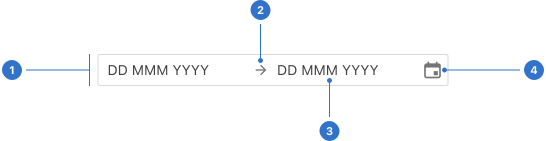
- Input range: a container for text entry.
- Separator: a visual bridge between date ranges.
- Input: a date label within a date field.
- Icon: a calendar icon within a date field.
Date picker - Single
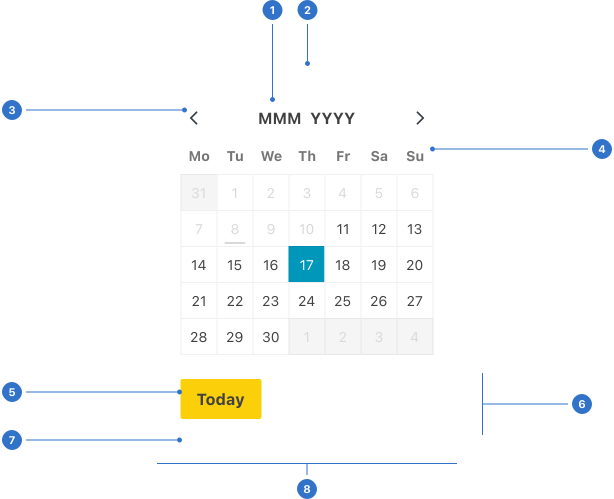
- Month and year: the month and year title.
- Arrow: a pointer indicating the source of the calendar popover.
- Pagination: navigation to previous and next dates.
- Week label: shows day labels within a defined week or month.
- Button: a button for an action.
- Footer: a panel for buttons.
- Elevation: a shadow around the calendar panel.
- Popover: a container with calendar elements.
Date picker - Range
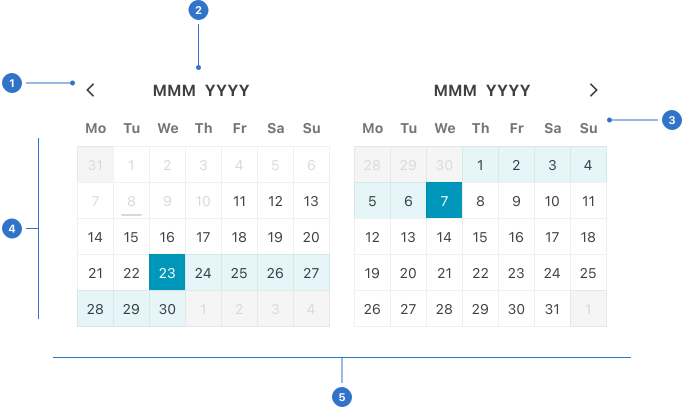
- Pagination: navigation to previous and next dates.
- Month and year: month and year titles.
- Week label: shows day labels within a defined week or month.
- Date tiles: a container with a range of date elements.
- Popover: a container with calendar elements.
Live playground
Types
There are four types of date picker:
- single
- range
- native
- date input
A calendar within a date picker will include the day, week, month and year.
State
Input
- Default is the initial state prior to interaction.
- Disabled indicates that the date picker is not interactive and cannot be used.
- Invalid indicates that the user has entered incorrect/invalid information.
- Hover provides feedback on mouseover indicating the input is interactive.
- Focused communicates that the input has received focus from a click, tap, or a keyboard tab key.
Date tile
- Default has a date in the current period which can be selected.
- Inactive has a date from a previous or future calendar period.
- Disabled indicates a date which cannot be selected.
- Selected indicates that a date has been selected.
- In range indicates a date which is within the range of a selected start and end date.
- Current indicates the current date.
- Hover provides feedback on mouseover, indicating the input is interactive.
Format
Size
A date picker can be small, medium or large.
Accessibility
Shell DS components are programmatically determinable with appropriate semantic markup and are designed to meet colour contrast requirements. If you’re not using Shell DS code, you will need to cover the accessibility considerations for each component in this pattern.
- Date picker labels should clearly describe the dates that the user needs to input.
- Make the date picker interactive and selectable for keyboard and screen reader users.
- Give keyboard users a choice of either an input field or a date picker, and don't limit them to only one or the other.
- Ensure the buttons and UI in the date picker are labelled properly and relationships are clear. If a screen reader user interacts with a specific day, they should hear the date in full, e.g., 'Saturday, 1 October 2022' , not just '1'.
- Meet minimum contrast requirements to allow all users to see, understand, and select the dates they need to.
Every effort has been made to ensure that the Shell Design System follows accessibility best practice.
The Shell DS React framework incorporates keyboard operation to support the widest variety of assistive technologies and devices. For any future frameworks other than React, accessibility will need to be reviewed.
Help us to help you by contacting the Accessibility team for support and information regarding any questions relating to accessibility.
Related
Is this page useful for you?
Your feedback helps to improve our documentation.