 GitHub
Card

A card is a container which summarises and groups content. It is commonly used as an entry point allowing users to explore further information.
Usage
Do
- Keep cards simple, to show available information.
- Use cards to group related content.
Don't
- Avoid overloading cards with more information or interactive elements than necessary.
- Avoid overriding a card’s visual appearance.
Anatomy
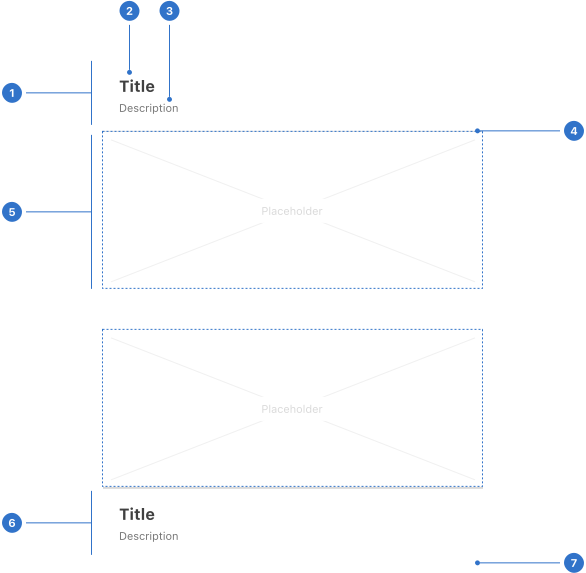
- Header: the section at the top of the card.
- Title: the label or subject of the content.
- Description: supporting text related to card content.
- Border: a line around the top and bottom of content area.
- Content area: represents space for card content.
- Footer: the section at the bottom of the card.
- Elevation: a shadow around the card panel.
Live playground
Types
Our card has two types (with variants to include a header, a footer or both):
- card
- inset card
Format
Cards are rectangular with subtle borders and elevation shadow to differentiate them from the background. They may either include a title in the header and footer areas or not. Cards may be positioned anywhere on the screen.
Size
Medium is the default size for a card. Use large cards in large views when it's necessary to present a lot of content at once. Small cards are best for small containers such as modals, drawers, popovers or trays.
Padding
The header and footer areas of the card are available with two padding options: tight and generous. These change in size according to the size of the card.
Elevation
Cards, by default, are set to use Fabric level 0 Elevation so that they have a small amount of definition against the background surface.
Content
There are a variety of different types of cards, but the purpose of all card content is to set an expectation for what happens when a user interacts with it. Content sits in the header, main body and footer areas of the card.
Keep card content concise
Titles are short (five to seven words) and should focus on the value a user will get from interacting with the card. Descriptive content should be brief - about 10-15 words (or more depending on the complexity of the information) - complementing the title with more in-depth context.
Be clear about the card's destination
Cards take someone to another experience, so the content should focus on the value they find when they get there.
Accessibility
Shell DS components are programmatically determinable with appropriate semantic markup and are designed to meet colour contrast requirements. If you’re not using Shell DS code, you will need to cover the accessibility considerations for each component in this pattern.
Every effort has been made to ensure that the Shell Design System follows accessibility best practice.
The Shell DS React framework incorporates keyboard operation to support the widest variety of assistive technologies and devices. For any future frameworks other than React, accessibility will need to be reviewed.
Help us to help you by contacting the Accessibility team for support and information regarding any questions relating to accessibility.
Is this page useful for you?
Your feedback helps to improve our documentation.