 GitHub
Button group

A button group is a set of input components grouped in a logical set. The action of each button is clearly identified with a label and/or icon so that users can select or deselect options.
Usage
Do
- Use a button group to contain a set of buttons that each have binary 'on/off' selection and deselection, effective immediately.
- Use a radio button group to enable the selection or deselection of one option.
- Use a checkbox button group to enable the selection of multiple options.
Don't
- Avoid using a button group for more than five buttons.
- Never override button styling - maintain consistent styling of icons and labels in every button in the group.
Anatomy
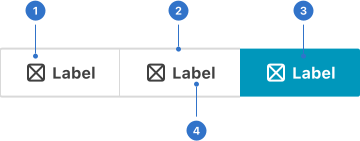
- Icon: graphical signage representing section.
- Border: a linear frame around the button.
- Background: the tone indicating the state of button.
- Label: the name or title of the button.
Live playground
Types
Depending on the type (radio or checkbox), one or multiple buttons within the group can be either selected or deselected respectively.
- Radio (default) is for an exclusive selection. Selecting one option deselects any other.
- Checkbox is for multiple selection of options which are logically grouped.
Variants
With icon where buttons within the group can either have an icon and a label, or an icon only.
States
- Default communicates that a component or element is interactive.
- Hover provides feedback on mouseover, indicating the input is interactive.
- Pressed is initiated by user tap, cursor or keyboard on an interactive element.
- Focused communicates when a user has highlighted an element, using an input method such as a keyboard or voice.
- Disabled shows that the element is not interactive and cannot be selected.
- Selected communicates a user choice.
Format
Size
A button group can be extra-small, small, medium or large.
Groups
A button group has a default set of three buttons within it.
Icon placement
An icon can be placed to the left or right of the label. Alternatively, a button can feature an icon without a label.
Appearance
A set of buttons are grouped in a logical set.
Content
Make labels on buttons in the group clear and concise, and ideally no more than two or three words. Use words which inform the user which option the button will select or deselect.
Icons
These should clearly represent the button’s action.
Behaviours
In a radio button group, selection is exclusive so selecting one button automatically deselects the others.
In a checkbox button group, multiple buttons can be selected simultaneously and need to be manually deselected.
Accessibility
Shell DS components are programmatically determinable with appropriate semantic markup and are designed to meet colour contrast requirements. If you’re not using Shell DS code, you will need to cover the accessibility considerations for each component in this pattern.
- Make the relationship of the button grouping programmatically determinable, through use of appropriate semantic markup, so that this will be made clear to users of screen readers.
- Use a clear and concise label.
- Meet colour contrast requirements when communicating the selected state.
- Alert users if clicking a button in the group is going to cause a change in context.
- Ensure unique, distinct labels if you are using multiple button groups on a page.
- Let all users know if the button group is a required field.
- In a form, support input errors with a validation message.
Every effort has been made to ensure that the Shell Design System follows accessibility best practice.
The Shell DS React framework incorporates keyboard operation to support the widest variety of assistive technologies and devices. For any future frameworks other than React, accessibility will need to be reviewed.
Help us to help you by contacting the Accessibility team for support and information regarding any questions relating to accessibility.
Related
Is this page useful for you?
Your feedback helps to improve our documentation.