 GitHub
Stepper

A stepper is used to convey progress through logically sequenced steps. It is also used to navigate between those steps.
Usage
Do
- Use if there is a process which requires two steps or more.
- Simplify the process if it requires more than six steps.
Don’t
- Use multiple steppers on a page or to break up sections.
Anatomy
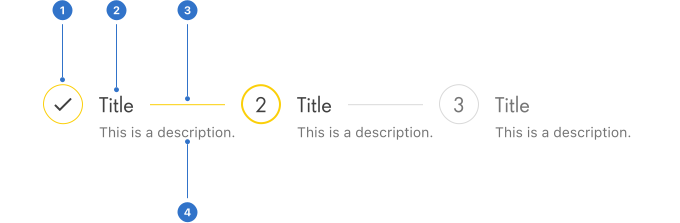
- Indicator: current status of the step.
- Title: a label describing the step.
- Description: the supporting text under the title.
- Line: a visual connection that indicates progress between steps.
Live playground
Types
- Default uses an icon to indicate the status of the step.
- Dot uses a simplified approach to identify the step.
- Navigational offers the user selectable links that can be used as navigation between steps.
States
- Selected indicates the current step is selected.
- Previous indicates the steps which have already been completed.
- Next indicates future steps which have not been completed yet.
Content
Title
Use titles which clearly indicate the purpose of the step, in a single line of one or two words.
Indicator
In a default stepper the number of the step changes to a tick icon to show that the step has been completed.
Description
Ensure supporting information is relevant and concise.
Accessibility
Shell DS components are programmatically determinable with appropriate semantic markup and are designed to meet colour contrast requirements. If you’re not using Shell DS code, you will need to cover the accessibility considerations for each component in this pattern.
Screen readers
A stepper item's state should be exposed to a screen reader, to determine which step a user is currently on, and which they have already completed in the navigation.
Every effort has been made to ensure that the Shell Design System follows accessibility best practice.
The Shell DS React framework incorporates keyboard operation to support the widest variety of assistive technologies and devices. For any future frameworks other than React, accessibility will need to be reviewed.
Help us to help you by contacting the Accessibility team for support and information regarding any questions relating to accessibility.
Related
Is this page useful for you?
Your feedback helps to improve our documentation.