 GitHub
Stat

A stat is used to display a single statistic.
Usage
Do
- Use a stat to highlight data.
- Use a stat to display data with a description.
Anatomy
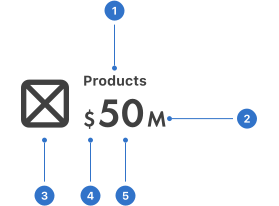
- Label: the title of the content.
- Suffix: a character or symbol positioned after the value.
- Icon: a graphical representation to add visual meaning.
- Prefix: a character or symbol positioned before the value.
- Value: a numeric or text label which represents information in context.
Live playground
Format
Size
The stat comes in four different sizes: small, medium (default), large and extra-large.
Icon placement
The icon can be placed beside the value, label, the entire stat or it can be hidden completely.
Alignment
The icon is placed on the right side of the text.
Content
Label
A label is displayed next to the stat. Only use one or two words for the label, keeping it clear and concise.
Icon
The icon adds visual meaning to the context of the stat.
Suffix and prefix
These refer to the context of the stat. For example, currency symbols or units of measurement.
Accessibility
Shell DS components are programmatically determinable with appropriate semantic markup and are designed to meet colour contrast requirements. If you’re not using Shell DS code, you will need to cover the accessibility considerations for each component in this pattern.
Screen readers
Items comprising the stat must be logical in the DOM. This information must be shared with assistive technology so that users understand the information. For example, it should read out (using the anatomy example) 'products’ engines $50 million'.
Animation
If the stat animates for longer than five seconds and autoplays, a method must be provided to pause, stop or hide the media content.
Use animation sparingly as it is distracting to the end user, particularly if more than one animated UI element is visible at the same time.
Every effort has been made to ensure that the Shell Design System follows accessibility best practice.
The Shell DS React framework incorporates keyboard operation to support the widest variety of assistive technologies and devices. For any future frameworks other than React, accessibility will need to be reviewed.
Help us to help you by contacting the Accessibility team for support and information regarding any questions relating to accessibility.
Related
Is this page useful for you?
Your feedback helps to improve our documentation.