 GitHub
Slider

A slider is an adjustable selector used to increase or decrease values by moving handles over a horizontal track.
Usage
Do
- Use a slider to display, and allow users to set, an approximate range or value.
- Always include a label, written in sentence case.
- Ensure slider is always used in conjunction with a form field component.
Don’t
- Avoid using a slider where you need to obtain a precise value within a large range.
- Try not to use range sliders for extremely small values (one to three).
Anatomy
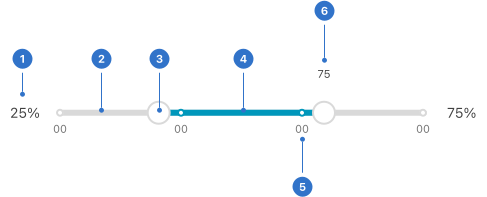
- Value: a numeric value that corresponds to handle placement.
- Track: the range that is available for selection.
- Handle: an indicator that can be moved along the track to determine value.
- Fill: the background colour indicating the selected range.
- Mark: predetermined values placed along the track.
- Tooltip: a notification indicating the value in conjunction with the cursor or mouse position.
Live playground
Types
- Slider: used to show an input value.
- Range slider: used to show a range between two values.
Variants
- Slider can have a tooltip (either default or custom) to add supplemental information that supports the context of the slider.
States
- Default: a default state communicates an interactive component or element.
- Disabled: a disabled state communicates a noninteractive component or element.
- Hover: a hover state communicates when a user has placed a cursor above an interactive element.
- Focused: a focused state communicates when a user has highlighted an element using an input method such as user tap, cursor, mouse or keyboard.
Format
Size
Sliders come in three different sizes: small, medium (default) and large.
Label position
A label is placed close to the slider, either above or below, on the left, the right - or both.
Marks
These show predetermined values placed along the track. The user can move the slider in increments anywhere on the track.
Fixed marks
These indicate fixed values that the slider moves to. There are no intermediate positions available.
Content
Custom tooltip
Information which accompanies the slider must relate clearly to the indicated value.
Label
Displayed with slider must be concise and specific.
Behaviours
Keyboard focus
A slider can be navigated using a keyboard. The keyboard focus state takes the slider’s visual hover state and adds a blue ring to the slider handle in focus.
Accessibility
Shell DS components are programmatically determinable with appropriate semantic markup and are designed to meet colour contrast requirements. If you’re not using Shell DS code, you will need to cover the accessibility considerations for each component in this pattern.
Labels
The label must be programmatically associated with the slider component.
Keyboard interaction
Arrow keys (up/down or left/right) can be used to change the value of the slider by increments. Shift + Tab navigates backwards. Tab navigates forwards.
Every effort has been made to ensure that the Shell Design System follows accessibility best practice.
The Shell DS React framework incorporates keyboard operation to support the widest variety of assistive technologies and devices. For any future frameworks other than React, accessibility will need to be reviewed.
Help us to help you by contacting the Accessibility team for support and information regarding any questions relating to accessibility.
Related
Is this page useful for you?
Your feedback helps to improve our documentation.