 GitHub
Text area

A text area is a multi-line, resizable text input which allows users to enter large amounts of text.
Usage
Do
- Use text area for longer text entries, over multiple lines.
- Use when you need to obtain a large block, or multiple lines of text.
- Enable resizing to allow users to adjust size for comfortable input.
- Ensure you provide enough space if you disable the ability to resize.
- Use in forms.
Don’t
- Avoid for a single word or line of text, use a simple text input instead.
- Avoid making the text area too small. A user shouldn't have to resize by default.
Anatomy
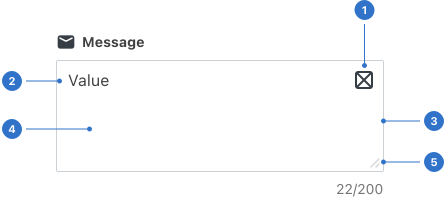
- Icon: a visual cue.
- Content: text entered into the field.
- Border: an outline that frames the text area.
- Background: the colour or tone of the component background.
- Resize handle: a draggable element used to change the size of the component.
Live playground
Types
Text area has one type.
Variants
With icon includes an icon.
States
- Default has an empty placeholder for users to input data.
- Hover provides feedback on mouseover, indicating the item is interactive.
- Focused communicates when a user has highlighted an element, using an input method such as user tap, cursor, mouse or keyboard.
- Invalid indicates an error.
- Disabled is indicated by placeholder text which remains visible in the input area unless the user is entering information.
Format
Size
Text area is available in small, medium (default) and large.
Icon placement
Icons can be placed to the left or right of the input area.
Resize handle
Text area features a resize handle for users to specify the height of the input they require.
Content
- Use a concise label to show the information required in the text area input.
- Use supportive helper text for clarification of field input. Placeholder text by itself is insufficient as it is not always visible.
- Helper text above the text input and beneath the area label can be included if it helps the user to understand the field.
Accessibility
Shell DS components are programmatically determinable with appropriate semantic markup and are designed to meet colour contrast requirements. If you’re not using Shell DS code, you will need to cover the accessibility considerations for each component in this pattern.
- All non-text content must have a text alternative that serves the equivalent purpose (e.g. alt text for the icon).
- The name and role of the text area must be programmatically identifiable for assistive technology (AT), so that AT users understand what it is and how to use it.
- Hints and errors should be read after the text area label. For example, 'Enter your comments – 100 characters remaining'.
- The state and changes to it should be programmatically identifiable for AT.
- The label must be explicitly programmatically associated with the text area, whenever possible.
- The label must describe the topic or purpose of the text area so users know what input is expected.
Every effort has been made to ensure that the Shell Design System follows accessibility best practice.
The Shell DS React framework incorporates keyboard operation to support the widest variety of assistive technologies and devices. For any future frameworks other than React, accessibility will need to be reviewed.
Help us to help you by contacting the Accessibility team for support and information regarding any questions relating to accessibility.
Related
Is this page useful for you?
Your feedback helps to improve our documentation.