 GitHub
Badge

A badge shows a numerical value or a status descriptor for user interface elements. It draws attention to notifications or important interface elements, showing additional information to users on interaction.
Usage
Do
Attach to components which require additional visual information.
Don't
Never use a badge on its own.
Anatomy
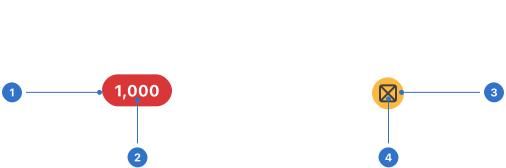
- Container: a flexible shape containing content.
- Label: numerical or text content.
- Background: colours which indicate the label’s state.
- Icon: a graphical indicator within a container.
Live playground
Types
Badges have three types: filled, subtle or outlined.
States
A badge always has a semantic meaning and uses colour to add visual meaning. The following states are available:
- Neutral: indicates something is neither good nor bad and doesn’t require much attention.
- Positive: indicates something is good, correct, successful or safe and should be noticed.
- Negative: indicates something is bad, wrong, unsuccessful or dangerous and should be noticed.
- Information: indicates something which is only informational but should be noticed.
- Warning: indicates something critical or requires caution and should be noticed.
Format
Size
Badges can be micro, extra-small, small, medium (default) or large.
Placement
Badges provide further information and should be visibly attached to the related element.
Content
A numerical value or icon is used in a badge to display simple contextual information, with colour used to convey additional visual meaning.
Accessibility
Shell DS components are programmatically determinable with appropriate semantic markup and are designed to meet colour contrast requirements. If you’re not using Shell DS code, you will need to cover the accessibility considerations for each component in this pattern.
Text alternatives
Colour alone isn’t enough to communicate effectively with all users. Provide text alternatives for any non-text content, and include context. For example, the badge should read '10 unread emails' instead of just '10'.
Every effort has been made to ensure that the Shell Design System follows accessibility best practice.
The Shell DS React framework incorporates keyboard operation to support the widest variety of assistive technologies and devices. For any future frameworks other than React, accessibility will need to be reviewed.
Help us to help you by contacting the Accessibility team for support and information regarding any questions relating to accessibility.
Related
Is this page useful for you?
Your feedback helps to improve our documentation.