 GitHub
Avatar

Avatars are thumbnail representations of individuals within our digital interfaces at Shell. They show someone’s visual identity.
Usage
Do
Use an avatar to display the identity of a user, team or organisation.
Don't
Avoid using an avatar as a non-interactive icon, or without offering related user information.
Anatomy
Avatar
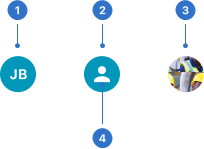
- Abbreviation: the first letter of first name and surname.
- Icon: a graphical representation of a profile image.
- Image: a profile photo.
- Background: a solid background colour.
Avatar With Text
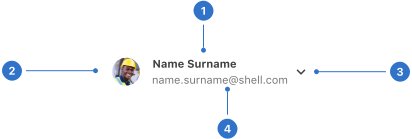
- Label: avatar name or title.
- Background: solid background colour.
- Avatar: circular framed profile photo, icon or initials.
- Popover button: icon used to indicate an action.
- Additional text: subtext that sits below the label.
Live playground
Types
There are two types of avatar: a single avatar component, and avatar with text. Both have configuration options.
Format
Applicable to both avatar and avatar with text.
Size
The avatar component has small, medium (default) and large sizes.
Content
Abbreviation
Abbreviations are used when an image is unavailable, such as initials.
Image
This is a visual representation of an individual, team or organisation.
Icon
If both image and abbreviation are unavailable, a person icon is displayed.
Additionally, an avatar with text has the following options available:
Label
A label is displayed next to the avatar. Do not use more than two words for the label, keeping them clear and concise.
Additional text
This supporting information sits below the label and should be concise.
Accessibility
Shell DS components are programmatically determinable with appropriate semantic markup and are designed to meet colour contrast requirements. If you’re not using Shell DS code, you will need to cover the accessibility considerations for each component in this pattern.
- All content in abbreviated names, labels and additional text should be clear and concise, and meet WCAG 4.5:1 colour-contrast requirements.
- The title prop of the avatar component must passed to the image element as the alt text to provide descriptive identification of the non-text content.
- Alt text must be listened to in its entirety (the reading of it cannot be paused), so keep your alt text concise but descriptive.
Every effort has been made to ensure that the Shell Design System follows accessibility best practice.
The Shell DS React framework incorporates keyboard operation to support the widest variety of assistive technologies and devices. For any future frameworks other than React, accessibility will need to be reviewed.
Help us to help you by contacting the Accessibility team for support and information regarding any questions relating to accessibility.
Related
Is this page useful for you?
Your feedback helps to improve our documentation.