 GitHub
Accordion

An accordion is a stack of vertical headers which hides or reveals chunks of content. The title of an accordion lets our users choose the sections of content they wish to read. It simplifies information discovery and processing for users.
Usage
Do
- Vertically organise related content in an accordion.
- Condense content in an accordion to reduce scrolling down a page.
- Use for between three and ten items of content.
Don't
- Avoid using horizontal content.
Anatomy
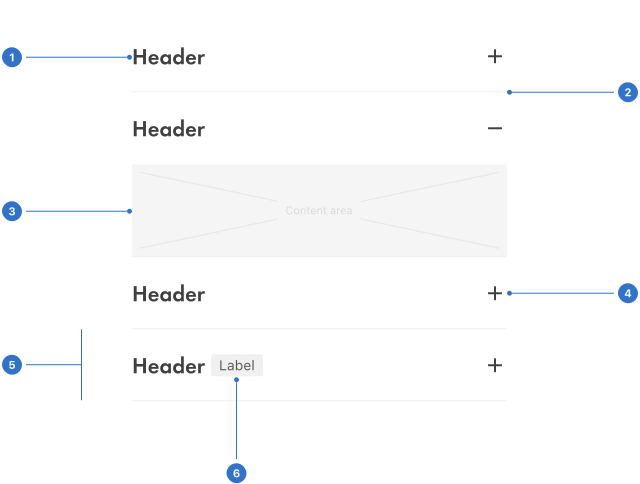
- Header: this is the section title and can be used as a control to open the panel.
- Border: used as a divider to separate the sections.
- Content area: relevant content information relating to the section header.
- Expand icon: typically used to signify an open or closed state.
- Focus outline: a visual cue indicating a panel has been selected by keyboard or voice.
- Extra area: space for an additional label, icon or tag.
Live playground
Types
- Extra contains an area for additional content.
- Border includes a border beneath the section.
- Expanded toggles to reveal an additional content area.
States
The state of an accordion changes when the user presses the collapse/expand icon.
- Default is the accordion's collapsed state.
- Active is the accordion's expanded state.
- Focused occurs in keyboard navigation. Tab keys focus the accordion and the enter key expands or collapses it.
- Disabled indicates the accordion is not interactive.
Format
Size
An accordion can be small, medium or large.
Alignment
The accordion aligns with page content which it relates to, and can be placed on the left or right.
Placement
An accordion is placed on the main page or can be contained in a card or drawer.
Content
Title
Ensure the title is clear, descriptive and concise.
Body
Larger amounts of content must only scroll vertically, and be split into paragraphs with sub-headings if necessary.
Scrolling content
An accordion should scroll vertically - never horizontally - if its content is longer than the viewport. Content within an individual panel should not scroll.
Behaviours
Each section of an accordion can be independently collapsed or expanded.
- Default allows users to display multiple content areas at once.
- Accordion allows users to display only one content area at a time.
Accessibility
Shell DS components are programmatically determinable with appropriate semantic markup and are designed to meet colour contrast requirements. If you’re not using Shell DS code, you will need to cover the accessibility considerations for each component in this pattern.
Keyboard interactions
Tab key
Tab moves focus to the next focusable element (label, title, heading etc), and all focusable elements in the accordion are included in the page tab sequence.
Enter key
When focus is on the accordion header of a collapsed section, the enter key expands the section.
Shift + Tab
Shift + tab moves focus to the previous focusable element and all focusable elements in the accordion are included in the page tab sequence.
Mouse
Users can change the state of an accordion by clicking on the chevron icon or near its header.
Screen readers
Ensure that semantic markup supports users of assistive technology so that they can scan accordion sections in the same way that a sighted user would.
Every effort has been made to ensure that the Shell Design System follows accessibility best practice.
The Shell DS React framework incorporates keyboard operation to support the widest variety of assistive technologies and devices. For any future frameworks other than React, accessibility will need to be reviewed.
Help us to help you by contacting the Accessibility team for support and information regarding any questions relating to accessibility.
Related
Is this page useful for you?
Your feedback helps to improve our documentation.