 GitHub
Menu

A menu is a versatile component which is used to display a list of selectable options or navigational items.
Usage
Do
- Structure menus logically with clear and concise labels.
- Use a menu to allow users to jump quickly from one section to another.
- Use a menu to provide access to commands, actions and options.
- Menu should easily open, close, and be interactive with buttons or tabs.
Don’t
- Avoid small menus on touch screens where a larger interactive area is required.
- Do not make labels overly long.
Anatomy
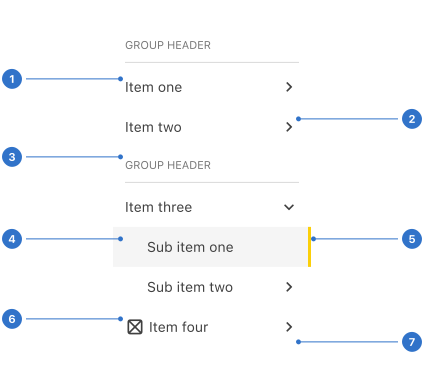
- Label: the name or title on the menu tab.
- Icon right: right-hand icon to trigger menu options.
- List heading: the section title of a menu list.
- Background: the colour indicating the state of the button.
- Indicator: highlights the current selection.
- Icon left: left-hand icon to add visual information to the label.
- Elevation: the shadow around the menu component.
Live playground
Types
- Inline menu collapses inline when a user interacts with it.
- Horizontal menu flies out when a user interacts with it.
- Vertical menu appears vertically.
Variants
- Emphasise is used to accentuate menu items.
State
- Default menu items are ready to be selected.
- Active indicates that the item is active.
- Expanded/Collapsed indicates the display of sub-menu items.
- Focused communicates that the input has received focus from a click, tap, or a keyboard tab key.
Format
Size
Menu is available in small, medium (default) and large sizes.
Indentation
The various levels of an inline menu are identified by horizontal indentation.
Behaviours
Vertical and horizontal menus
Sub-menu items are display in a fly-out.
Inline menus
Sub-menu items are displayed by expanding parent menu items.
Accessibility
Shell DS components are programmatically determinable with appropriate semantic markup and are designed to meet colour contrast requirements. If you’re not using Shell DS code, you will need to cover the accessibility considerations for each component in this pattern.
Labels
Text should be relevant and concise.
Icons
If using an icon in the menu, ensure that colour is not used by itself to give information. Appropriate alt text must be provided in order to convey the icon's purpose.
Keyboard users
- Provide a mechanism to skip repeated content for keyboard users.
- Ensure keyboard users can explore the top level of a collapsed menu and make navigation choices without having to tab through the entire menu.
Every effort has been made to ensure that the Shell Design System follows accessibility best practice.
The Shell DS React framework incorporates keyboard operation to support the widest variety of assistive technologies and devices. For any future frameworks other than React, accessibility will need to be reviewed.
Help us to help you by contacting the Accessibility team for support and information regarding any questions relating to accessibility.
Related
Is this page useful for you?
Your feedback helps to improve our documentation.