 GitHub
Loading

A loading spinner is used to inform the user that something is in progress.
Usage
Do
Position a loading spinner horizontally and vertically centred in the area which is loading.
Don't
- Avoid using a loading spinner for processes longer than five seconds, where a progress bar is more suitable.
- Do not use for for wait times of less than one second.
- Avoid using too many loading spinners at once.
Anatomy
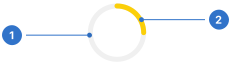
- Track: the circular boundary for the fill to travel along.
- Spinner: a circular boundary for the spinner to animate within.
Live playground
Format
Size
Loading components are available in four sizes: large, medium, small and extra-small.
Colour
The colour is determined by the background the loading spinner appears on.
- On Surface (default): used when the spinner appears on a surface.
- On Primary: used when the spinner appears on primary accent.
- On Tertiary: used when the spinner appears on tertiary accent.
Alignment
Loading spinners should appear horizontally and vertically centred over a page or content that is loading.
Accessibility
Shell DS components are programmatically determinable with appropriate semantic markup and are designed to meet colour contrast requirements. If you’re not using Shell DS code, you will need to cover the accessibility considerations for each component in this pattern.
- The loading component is used to notify the user that the page content is loading. W3C WAI-ARIA role="alert" and aria-live="polite", are recommended so that the screen reader can finish the current announcement, before announcing a default aria-valuetext="loading".
- Ensure the colour contrast is 3:1, in accordance with WCAG guidelines.
Every effort has been made to ensure that the Shell Design System follows accessibility best practice.
The Shell DS React framework incorporates keyboard operation to support the widest variety of assistive technologies and devices. For any future frameworks other than React, accessibility will need to be reviewed.
Help us to help you by contacting the Accessibility team for support and information regarding any questions relating to accessibility.
Related
Is this page useful for you?
Your feedback helps to improve our documentation.