 GitHub
Progress bar

A progress bar displays the status of an ongoing process. It indicates completion as a percentage.
Usage
A progress bar informs users of the remaining process, with or without a value.
Do
Use a progress bar to display the percentage of a completed process, such as uploading files or upgrading.
Anatomy
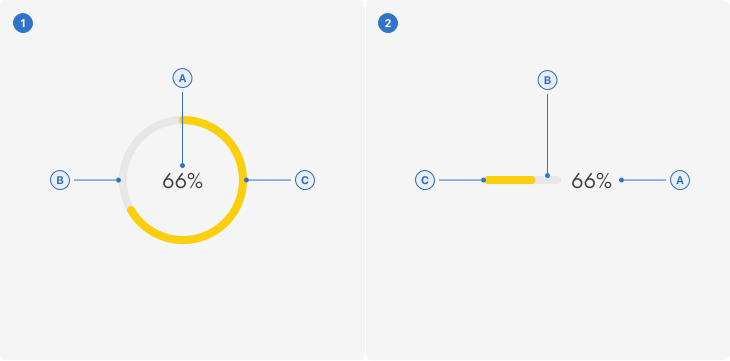
- Progress bar - Circle
A. Label: a number that represents a percentage.
B. Track: the circular boundary of the progress bar.
C. Progress: a visual representation of growth.
- Progress bar - Line
A. Label: a number that represents a percentage.
B. Track: the linear boundary of the progress bar.
C. Progress: a visual representation of growth.
Live playground
Types
- Circular: shows the progress of a task in a progressive manner.
- Linear: shows the progress of a task in a linear manner.
Variants
- Initial value, without a numerical value.
- With value includes a numerical value.
States
- Positive indicates a task is ongoing.
- Success indicates a task has successfully completed.
- Negative indicates an error encountered during the progress of the task.
Content
Labels
Use a label to specify the percentage of completion for the loading process.
Helper text
Use helper text with a progress bar when the process entails more wait time or is complex.
Accessibility
Shell DS components are programmatically determinable with appropriate semantic markup and are designed to meet colour contrast requirements. If you’re not using Shell DS code, you will need to cover the accessibility considerations for each component in this pattern.
Assistive technologies
The state of the progress bar must be programmatically shared with assistive technology (AT) in order for AT users to understand if the action is still in progress and at what percentage it is, when it has successfully completed, or if an error has occurred.
Colour
Colour alone may not be used to convey information, so a progress bar must always be accompanied by descriptive text on the label.
Helper text
- Longer text: the relationship of the helper text to the progress bar should be programmatically identifiable to assistive technology, for example by using aria-describedby.
- Brief text: the relationship of the helper text to the progress bar should be programmatically identifiable to assistive technology, for example by using aria-labelledby.
Every effort has been made to ensure that the Shell Design System follows accessibility best practice.
The Shell DS React framework incorporates keyboard operation to support the widest variety of assistive technologies and devices. For any future frameworks other than React, accessibility will need to be reviewed.
Help us to help you by contacting the Accessibility team for support and information regarding any questions relating to accessibility.
Related
Is this page useful for you?
Your feedback helps to improve our documentation.