 GitHub
Modal

A modal is a secondary dialog which overlays a page without altering context. It focuses user attention on a task or information.
Usage
Do
- Reserve the use of modals for short, less frequent tasks and information, since they interrupt a user’s workflow.
- Ensure that the option to close the modal is made clear to the user.
Don’t
- Avoid using more than one modal at a time.
- Avoid using multiple modals in quick succession.
Anatomy
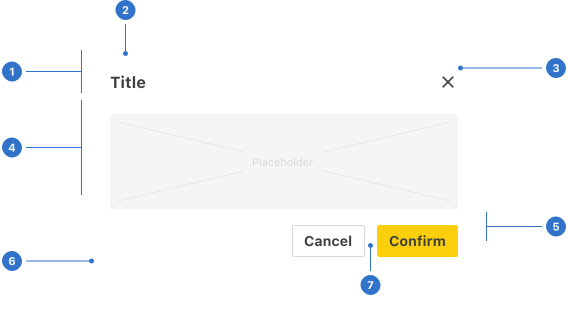
- Header: the content section above the main content area.
- Title: the heading text.
- Dismiss: a clickable icon to close the modal.
- Placeholder: a space for content in the modal.
- Footer: the content section below the main content area.
- Elevation: the shadow around the modal component.
- Actions: buttons, links and other clickable elements.
Live playground
States
- Loading indicates a system process is in progress.
Format
The different sections of a modal can be formatted to display content according to its context on a page.
Size
Modals can be small, medium or large, according to the amount of content required.
Padding
Padding for modals is either tight or generous. The body padding can also be removed when you need content to fit flush with the edge of the modal.
Header title
Contains the modal’s title text.
Header description
Additional description text can be positioned above or below the label in the header section.
Footer flow
Buttons within the footer can be aligned horizontally, side by side, or extended full width across the modal.
Footer alignment
Buttons within the footer can sit side by side, aligned left, right or centred.
Content
Header
- The title should be clear and concise, using a verb and noun combination which specifically describes the dialog’s task or purpose.
- An optional label above the title can be used to set the context for the information in the dialog.
Body
A modal should only include content relevant to completing the current task, using sentence case.
Footer
- Use specific verbs for actions such as Cancel, Confirm, and Save.
- Avoid unclear words such as Done or OK.
- For any other non-primary actions, use a link in the modal’s body.
- Button hierarchy is established by using primary and secondary styling options.
Behaviours
Scrollable modals allow the user to scroll dialog content.
Dismissing a modal
Dismissing a modal can be done in either of two ways.
- Pressing the close icon (x).
- Clicking elsewhere outside the modal.
Accessibility
Shell DS components are programmatically determinable with appropriate semantic markup and are designed to meet colour contrast requirements. If you’re not using Shell DS code, you will need to cover the accessibility considerations for each component in this pattern.
Assistive technologies
Modal components include a WAI ARIA role="dialog" and aria-modal="true" so that assistive technologies know that the primary window underneath the current dialog is inert.
Legibility
- Dialog should fill 100% of the screen to make the content easier to read when displayed on small screens.
- Obscuring the inert background window also hides background movement on some mobile devices when scrolling content inside the dialog.
Focus
- When the modal dialog opens, focus must be shifted to the dialog window.
- Focus must be maintained within the modal dialog window until the user presses the close button or uses the esc key to close the dialog window. No matter how many times tab or shift+tab are pressed, the focus loops through the interactive elements of the modal dialog until it is closed.
- When the modal is closed, the focus should be maintained by returning to the interaction or location that launched the modal.
Screen readers
A dialog window must be contextually identified for screen reader users, with a title/header using aria-labelledby.
Every effort has been made to ensure that the Shell Design System follows accessibility best practice.
The Shell DS React framework incorporates keyboard operation to support the widest variety of assistive technologies and devices. For any future frameworks other than React, accessibility will need to be reviewed.
Help us to help you by contacting the Accessibility team for support and information regarding any questions relating to accessibility.
Related
Is this page useful for you?
Your feedback helps to improve our documentation.