 GitHub
Navbar

A navbar is constant across our digital products and houses key elements for brand, navigation and personalisation.
Usage
Do
- Use to provide a consistent navigational experience.
- Include the Shell Pecten and keep product branding simple.
Don’t
- Avoid including a navigation with too many top-level items.
- Do not style or override the colour of the header.
Anatomy
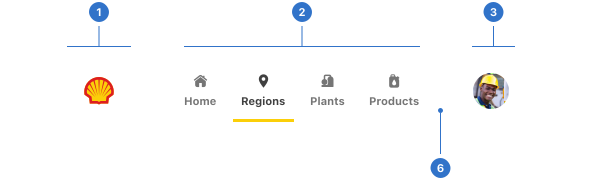
- Area 1: the space for Shell’s corporate logo.
- Area 2: the space where navigation components can be added.
- Area 3: the space for an avatar component.
- Background: the colour of the component backdrop.
Live example
Types
- Horizontal can be positioned at the top or bottom of a screen and fills view width.
- Vertical can be positioned left of the screen and fills the view height.
Variants
- Elevation is used to control whether the navbar should overlay the page or appear inline.
Format
Placement
A navbar is placed at the top or the side of the screen. The elevated navbar allows content to be scrolled as it remains fixed.
Content
The navbar has three areas which contain content.
- Area 1 contains the Pecten and product identity.
- Area 2 should contain common navigation components such as a menu.
- Area 3 should contain the user’s identity and is where user preferences are accessed, such as account details and personalisation.
Accessibility
Shell DS components are programmatically determinable with appropriate semantic markup and are designed to meet colour contrast requirements. If you’re not using Shell DS code, you will need to cover the accessibility considerations for each component in this pattern.
- Use a landmark for navigation with an aria-label.
- Use a known location for menus: top or left side of the page.
- Give a clear visual heading to menus.
- Provide generous spacing between clickable elements.
Keyboard interaction
Include a mechanism to skip repeated content for keyboard users if navigation is repeated on every page and stays the same, for example, 'Skip to main'.
A keyboard user should be able to explore the top level of a collapsed menu and make a decision about whether and which sub-navigation they wish to expand and explore further.
Screen readers
Menu and menu items' states should be exposed to a screen reader, so it is able to determine how many links are in the menu and which item has already been visited or is selected.
Every effort has been made to ensure that the Shell Design System follows accessibility best practice.
The Shell DS React framework incorporates keyboard operation to support the widest variety of assistive technologies and devices. For any future frameworks other than React, accessibility will need to be reviewed.
Help us to help you by contacting the Accessibility team for support and information regarding any questions relating to accessibility.
Related
Is this page useful for you?
Your feedback helps to improve our documentation.