 GitHub
Pagination

Pagination allows a user to navigate content or data which is split over multiple pages.
Usage
Do
- Use to indicate a large amount of content, lists or data have been split over multiple pages.
- Use to allow users to quickly navigate between multiple pages.
Don't
- Pagination should not be used if the content is limited to a single page.
Anatomy
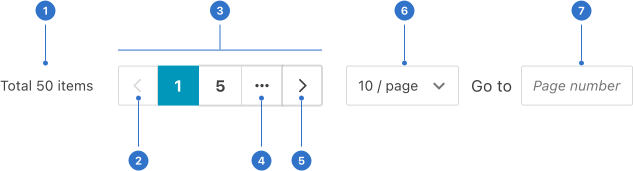
- Total: a label indicating the number of pages or items.
- Previous page: clickable control that allows users to navigate backwards.
- Links: page numbers and other clickable elements for navigation.
- More pages: an ellipsis icon indicating hidden pages within the sequence.
- Next page: a clickable control that allows users to navigate forward.
- Change page amount: enables users to change the number of viewable pages.
- Jump to page: enables users to skip to a page by entering a specific number in the input field.
Live playground
Types
- Default has pages which are displayed and numbered, with a forward and back button.
- Simple only features the current page number and the total number of pages are displayed.
Variants
- With jumper displays an input which allows a user to enter a specific page to quickly navigate to that page.
- More features multiple pages which are condensed, hidden, and referenced by an ellipsis.
- Show total displays the total number of pages.
Format
Size
There are three sizes: large, medium (default) and small.
Alignment
Pagination is commonly centre-aligned but can also be aligned left and right according to context and requirements.
Placement
Pagination is positioned at the bottom of the page or section.
Accessibility
Shell DS components are programmatically determinable with appropriate semantic markup and are designed to meet colour contrast requirements. If you’re not using Shell DS code, you will need to cover the accessibility considerations for each component in this pattern.
Assistive technologies
- Ensure the current page is programmatically identifiable for assistive technology (AT).
- Identify the pagination navigation as navigation to AT, by wrapping the links in a nav element.
- Add role="navigation" and a clear aria-label to make clear to AT that this navigation landmark is used for pagination. For example, aria-label="News Feed Pagination".
- Provide context for the pagination buttons through clear labelling for AT. For example, 'Go to Page 1' rather than simply '1'.
Every effort has been made to ensure that the Shell Design System follows accessibility best practice.
The Shell DS React framework incorporates keyboard operation to support the widest variety of assistive technologies and devices. For any future frameworks other than React, accessibility will need to be reviewed.
Help us to help you by contacting the Accessibility team for support and information regarding any questions relating to accessibility.
Related
Is this page useful for you?
Your feedback helps to improve our documentation.