 GitHub
Pecten

The Pecten is Shell’s official logo.
Usage
The Pecten is the core of Shell's brand identity and is a globally recognised symbol. Use it in digital products to express the Shell brand.
Do
Contact the Brand Central team to use the Pecten with any other identity logos, sub-brands, icons, or creative elements.
Don't
- Never use the Pecten without its keyline.
- Avoid using the Pecten over busy backgrounds.
- Don’t modify the Pecten in any way.
- Don’t repeat the Pecten more than once per screen or page.
Anatomy
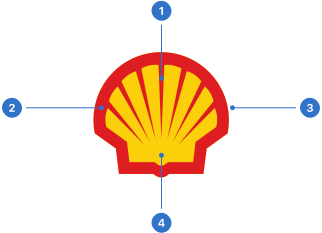
- Flutes: the seven lines that converge towards the bottom of the inner emblem, in Shell red.
- Outer Pecten: the border around the inner Pecten, in Shell red.
- Keyline: the white keyline around the red outer Pecten.
- Inner Pecten: the yellow inner Shell emblem.
Live playground
Types
The Pecten has three types.
- Coloured is solid yellow and red with a white keyline.
- Mono is a solid black Pecten over a white background.
- Mono on inverted is a solid white Pecten over a black background.
Format
Size
For digital applications, the smallest size of the Pecten is 16 dp, which must not be reduced.
Padding
The Pecten requires visibility, so it is important to ensure the space around it is kept clean and clear. For digital applications, optimal padding is 50%, and minimal padding is 30%. The Pecten must always be supported by a white keyline.
Colour
Use the coloured Pecten wherever possible.
Coloured
Solid yellow, red and white make up the primary colour palette of the Pecten.
Mono
Mono is a single-coloured version for use in light and dark modes.
Accessibility
Shell DS components are programmatically determinable with appropriate semantic markup and are designed to meet colour contrast requirements. If you’re not using Shell DS code, you will need to cover the accessibility considerations for each component in this pattern.
Every effort has been made to ensure that the Shell Design System follows accessibility best practice.
The Shell DS React framework incorporates keyboard operation to support the widest variety of assistive technologies and devices. For any future frameworks other than React, accessibility will need to be reviewed.
Help us to help you by contacting the Accessibility team for support and information regarding any questions relating to accessibility.
Related
Is this page useful for you?
Your feedback helps to improve our documentation.