 GitHub
File uploader

File uploader enables users to select one or more files to upload.
Usage
Do
- Use to enable drag-and-drop file uploads.
- Show uploaded file information.
- Reject files with errors.
Anatomy
File uploader - Single
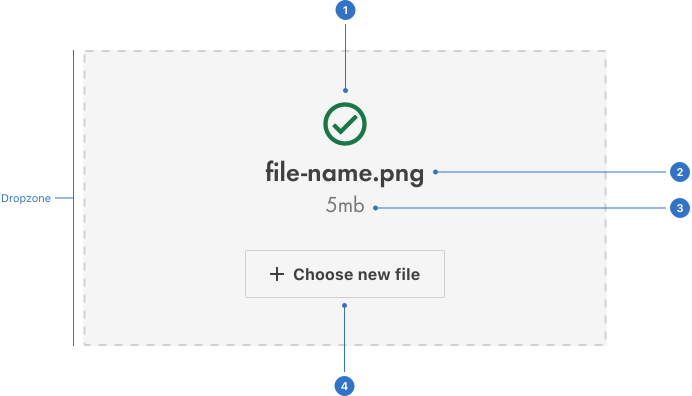
Dropzone: the area where users place files via drag-and-drop or selection.
- Status indicator: an area indicating the file upload status.
- Title: a short instruction, status or file name.
- Text: a description indicating acceptable files types, file name or metadata.
- Button: enables users to perform a specific action.
File uploader - Multi
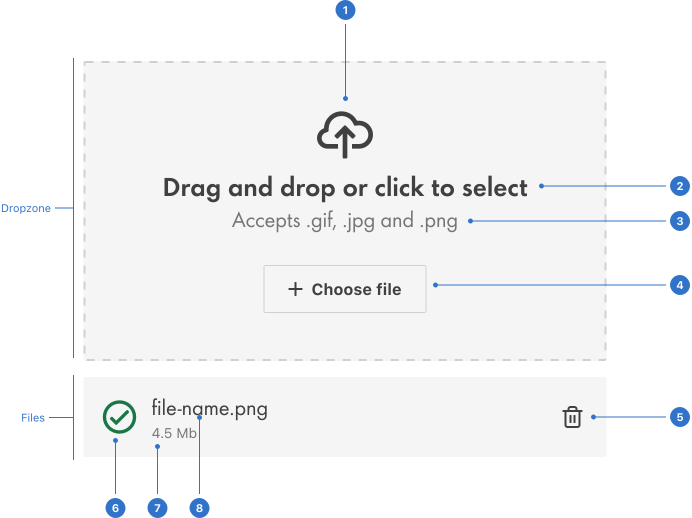
Dropzone: the area where users place files via drag-and-drop or selection.
- Icon: a graphical indicator within a container.
- Title: an instruction describing the action required.
- Text: a description indicating acceptable files types.
- Button: enables users to perform a specific action.
Files: a container with file information.
- Bin: a clickable icon used to delete files.
- Status indicator: an element indicating the file upload status.
- Meta: information providing metadata such as file size.
- Description: the file name and type.
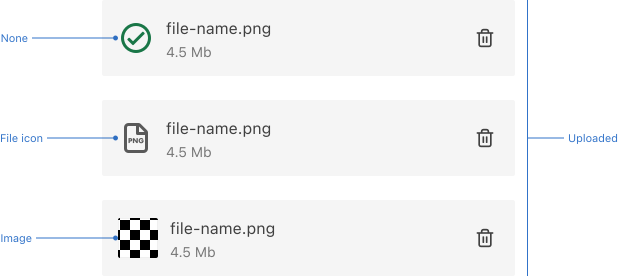
File uploader - Uploaded files
Live playground
Types
- Single file uploader uploads one file at a time.
- Multi-vertical file uploader uploads multiple files at a time, positioned below the dropzone.
- Multi-horizontal file uploader uploads multiple files at a time, positioned to the right of the dropzone.
States
File uploader states
- Default is the initial state prior to interaction.
- In progress indicates the file is loading.
- Success indicates the task is complete.
- Invalid file indicates the selected file is not supported.
File states
- Loading indicates a process is in progress.
- Uploaded indicates file upload is complete and sometimes displays a file icon or image.
Dropzone states
- Default is the initial state prior to interaction.
- Hover provides feedback on mouseover.
- Drop indicates the files are being dragged and dropped.
- Success indicates the task is complete.
- Disabled indicates the element is not interactive and cannot be used.
- Uploading (Loading spinner) indicates file upload is in progress.
- Uploading (Progress bar) indicates file upload is in progress.
- Invalid indicates the selected file is not supported.
Format
Size
A file uploader is available in extra-small, small, medium (default) and large.
Placement
File uploader can be placed anywhere in the UI depending on context. However, the placement must enable users to drag-and-drop with ease.
Content
Be clear
Give users a clear idea of the action that needs to be taken in the dropzone.
Mention restrictions
Specify the file restrictions including file types, format and size that the user can upload.
State the outcome
Ensure that button labels are precise about the outcome of the action it represents.
Behaviours
Drag and drop
Supports drag-and-drop interactions, enabling users to drag files into the application and drop them in the dropzone.
File selection
Users can select a file by clicking on a button.
Uploading multiple files
Users can select or drag-and-drop multiple files at once.
Visual feedback
Provides information on the progress of the upload.
Error handling
Displays error messages to indicate upload failure.
File preview
Allows users to see the file name, type and format of the selected file(s).
Usage guidelines
Dropzone
Provide sufficient space in the dropzone to make drag-and-drop interactions user friendly.
Accessibility
Shell DS components are programmatically determinable with appropriate semantic markup and are designed to meet colour contrast requirements. If you’re not using Shell DS code, you will need to cover the accessibility considerations for each component in this pattern.
Keyboard interaction
The dropzone should contain a button so that keyboard-only users can bypass the drag-and-drop functionality.
Screen readers
- When the user deletes a file, the name of the impacted file should be read out by the screen reader.
- Ensure the progress of file upload is announced to screen reader users.
Error messages
Ensure that error messages are announced to the user immediately, using aria-live.
Alternative text
Include alternative text for information conveyed through icons or icon-only buttons such as:
- States, e.g. 'file-name.png was uploaded successfully'
- Delete icon, e.g. 'delete file-name.png'
Every effort has been made to ensure that the Shell Design System follows accessibility best practice.
The Shell DS React framework incorporates keyboard operation to support the widest variety of assistive technologies and devices. For any future frameworks other than React, accessibility will need to be reviewed.
Help us to help you by contacting the Accessibility team for support and information regarding any questions relating to accessibility.
Related
Is this page useful for you?
Your feedback helps to improve our documentation.