 GitHub
Tooltip

A tooltip displays additional information to guide users when they hover or focus on a related element.
Usage
Do
- Associate a tooltip with an interactive element, such as a button icon.
- Use tooltips sparingly to share precise, supplementary information.
- Ensure that the tooltip is in close proximity to the element it supports.
Don’t
- Never use a tooltip to display information which is essential for completing a task. Such information should be made clear in page content.
- Avoid repeating information in a tooltip if it is already visible.
Anatomy
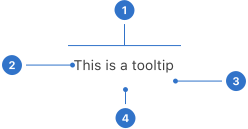
- Container: a flexible shape containing content.
- Text: content written within the container.
- Elevation: a shadow around the tooltip component.
- Arrow: a pointer indicating the source of the tooltip.
Live playground
Format
Alignment
It is important to match the tooltip arrow closely with its associated element, particularly when multiple elements are close to each other.
Placement
Tooltips may be positioned to the right, left, bottom, or top of the related element. It is important that a tooltip does not cover content which is essential to the user’s tasks, bleed off the page or disappear behind other content.
Content
Ensure that tooltip content is written in simple, clear, concise sentences. The tone of tooltip content should be:
- Informative, giving users enough information and guidance at every point in the flow to make a decision and continue with confidence.
- Generous, providing additional details and information to maximise understanding and reduce anxiety.
Accessibility
Shell DS components are programmatically determinable with appropriate semantic markup and are designed to meet colour contrast requirements. If you’re not using Shell DS code, you will need to cover the accessibility considerations for each component in this pattern.
Tooltips should not contain any interactive content such as links or buttons.
Visibility of tooltips
- A tooltip should remain visible until the user actively dismisses it, or until it is no longer valid.
- Content and other on-screen tasks should not be blocked by tooltips.
- Tooltips should not reappear on subsequent hovers while still in use.
Assistive technologies
- Any pointer device, keyboard or assistive technology should be able to discover and read a tooltip.
- Pointer devices should be able to move over the tooltip content without dismissing it.
Every effort has been made to ensure that the Shell Design System follows accessibility best practice.
The Shell DS React framework incorporates keyboard operation to support the widest variety of assistive technologies and devices. For any future frameworks other than React, accessibility will need to be reviewed.
Help us to help you by contacting the Accessibility team for support and information regarding any questions relating to accessibility.
Related
Is this page useful for you?
Your feedback helps to improve our documentation.