 GitHub
Timeline

A timeline displays a linear record in a chronological series of actions or events, broken down into stages.
Usage
Timeline gives an overall, top-level view of the stages in an activity, process or chronology, to:
- Show more detail in each stage.
- Display real-time events within a timespan.
Use cases
Consider whether a timeline or stepper is appropriate in the context of your use case. A timeline is used:
- For both limited and unlimited stages over time.
- To include additional content such as captions, images and UI elements.
A stepper is fixed to the completion of a task, such as filling in a form.
Do
- Use to show a chronological order of events or actions.
- Use to illustrate the sequence of events with past, present and/or future milestones.
Don’t
- Avoid blending icons and numbers on one timeline.
- Never alter the size of an individual stage within a timeline – maintain visual consistency.
Anatomy
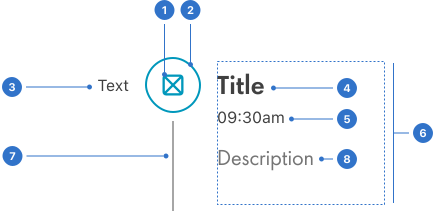
- Icon or number: a symbol or digit representing the step.
- Timeline dot: a milestone on the timeline.
- Opposite label: text for additional information.
- Title: name of the timeline section.
- Label: a text label to indicate the date or time.
- Content placeholder: an area for customisable content.
- Connector: a line that connects each stage in the timeline.
- Description: a short caption describing the timeline stage.
Live playground
Types
Timeline is available in both vertical and horizontal types.
Variants
- filled
- outlined
- transparent
States
The timeline is not an interactive component and therefore only alters during loading.
Sentiment
Sentiment refers to a combination of semantic colour and icons which communicate information about the stages on the timeline.
- Default: indicates that no system preference has been specified.
- Neutral: indicates something is neither good nor bad and doesn’t require much attention.
- Positive: indicates something is good, correct, successful or safe and should be noticed.
- Negative: indicates something is bad, wrong, unsuccessful or dangerous and should be noticed.
- Information: indicates something which is only informational but should be noticed.
- Warning: indicates something critical or requires caution and should be noticed.
Format
Size
Timeline is available in:
- small
- medium
- large
- extra-large
Alignment
Content can be aligned entirely on the:
- left
- right
- alternate starting left
- alternate starting right
Time
Timeline dots vary in appearance to indicate the position in the time sequence.
- The past is represented by an outlined icon and a solid connector.
- The present is represented by a filled icon and a solid connector.
- The future is represented by a transparent (icon-only) and a dashed connector.
Step position and connectors
Connectors between steps can be used differently depending on how steps are positioned in the timeline.
- Top - can have an extra connector on top.
- Middle - the connector cannot be toggled off.
- Bottom - can have an extra connector below.
Connectors can be added above and below steps if necessary.
Placement
Timeline is a versatile component and can be placed anywhere in the UI to suit your context.
Content
The default content has three areas.
Title
Consists of one or two specific words, and no more than three.
Label
Adds context to the title, usually a date or time, which should always follow a consistent format.
Description
Brief and relevant additional information, written in plain English with correct grammar and punctuation.
Content is also customisable, for use cases where you want to include additional elements, such as images and components.
- Ensure that time and date formats are consistent.
- Write clear and concise content in the description, limited to a short caption.
Accessibility
Shell DS components are programmatically determinable with appropriate semantic markup and are designed to meet colour contrast requirements. If you’re not using Shell DS code, you will need to cover the accessibility considerations for each component in this pattern.
Screen readers
Every stage on a timeline should be exposed to a screen reader, to announce which step a user is currently on.
Every effort has been made to ensure that the Shell Design System follows accessibility best practice.
The Shell DS React framework incorporates keyboard operation to support the widest variety of assistive technologies and devices. For any future frameworks other than React, accessibility will need to be reviewed.
Help us to help you by contacting the Accessibility team for support and information regarding any questions relating to accessibility.
Related
Is this page useful for you?
Your feedback helps to improve our documentation.